

Home›Articles›Melodee: a five-engine groovebox firmware with a cautio…
Articles

Melodee: a five-engine groovebox firmware with a cautious installer for the M-VAVE FM-1

Melodee firmware adds Prophet, FM6, CZ-1, SID and drum engines to the M-VAVE FM-1. What it does, how the installer works and what remains unverified.

Bernardo de Azevedo
Bernardo de Azevedo
· Updated
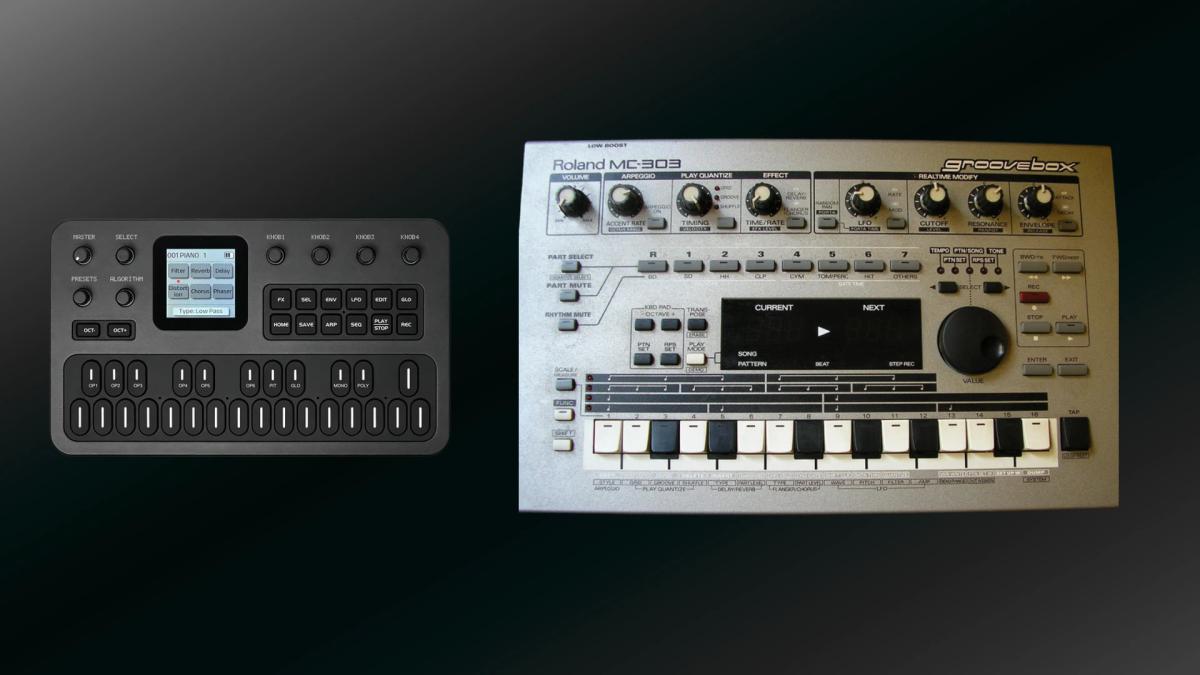
Melodee firmware: M-VAVE FM-1 pocket synthesizer beside a Roland MC-303 Groovebox

Melodee firmware is a multi-engine replacement operating system for the M-VAVE FM-1, published by Kerem Kilic under the GitHub name keremimo and the Ellic Studio label. It swaps the stock software for five instruments modelled on a Prophet-5, a DX7-style FM core, a Casio CZ-1, the SID chip and analogue drum machines, and surrounds them with a sequencer, a web editor and a guarded installer. The central question is how much of this ambition has been checked on real hardware, and how comfortable a cautious owner can be with the install.

Table of Contents

What Melodee firmware changes on the FM-1

On the stock unit, the FM-1 is a six-operator FM synthesizer with a small sequencer. Melodee firmware turns it into something closer to a pocket groovebox in which the FM engine is only one of several voices. The project describes itself on its GitHub repository as custom firmware for the FM-1 and lists a multi-engine synth and sequencer, USB host support and a shared effects rack as its main components.

The project belongs to the family of firmwares derived from Felucca, the open foundation described in our article on Felucca. Melodee is a modified version of that code base and follows the design of Felucca 1.0. The README states that the Melodee firmware is not affiliated with or endorsed by Hügelton Instruments, the maker of Felucca, and asks users to send bug reports to the Melodee repository instead.

The current stable release at the time of writing was 1.5.1, a small hotfix for a web editor connection error that appeared with the 1.5 firmware. The repository also offers a nightly channel for development builds, although stable is the default in the installer. The licence is GPL-3.0-only, with bundled third-party components carrying their own licences.

Five engines and a MIDI track

The sound engines are where Melodee firmware departs most clearly from the stock firmware. According to the README, PROPHET is an emulation of the Sequential Prophet-5 Rev 4 with 200 factory programs and 128 user slots. FM6 is a six-operator FM engine based on Dexed, with 32 algorithms and DX7 SysEx import. CZ-1 offers native Casio CZ-1 tones with 64 factory presets, and SID models the 6581 and 8580 chips after the reSID emulation, with 32 factory presets.

The fifth engine, DRUM, supplies synthesized TR-808 and TR-909 kits plus SID-based drum kits. The README credits the circuit models behind the 909 kick, snare, toms, rim and clap to the fm1-x0x project by Charles Vestal, whose firmware work is covered in our article on his X0X and FoMni firmwares. A sixth option, a MIDI Track, drives external instruments over USB.

Several earlier engines have been retired, among them ANALOG, PHASE, VOICE and NOISE, and the README says old projects that used them stay silent on those parts. Content for the old SAMPLE, GRAIN and SLICE engines, as well as custom drum kits, was removed as well. Owners moving from an older Melodee build, or from a firmware that relied on sample playback, should treat that as a real loss of function instead of a footnote.

Sequencer, effects and connections

Melodee firmware supports up to eight tracks. Tracks 1 to 4 can hold any of the instruments, while tracks 5 to 8, added in release 1.5.0, are MIDI-only and each send on a channel of their own. Each track has 64 steps and eight pattern banks, songs can run to 16 rows, and the whole project shares a pool of 1,024 timed notes. Input options include live recording, step entry and motion recording, with a four-slot modulation matrix per track and an arpeggiator.

Harmony tools are a distinctive part of the design. Release 1.5.0 introduced AUTO and AUTO2 modes: the first generates scale-based chords, and the second keeps the played key as the top note and adds harmony beneath it. The firmware also ships 70 scales, including microtonal tunings. Effects are organised as three insert slots per track plus a three-slot shared rack with chain or split routing, and 27 master punch effects adapted from SLOOP, the live-looping firmware discussed in our SLOOP article.

For connections, the README lists USB MIDI in and out, TRS MIDI and USB host mode for a keyboard or synth, either directly or through one powered hub. USB audio works without a driver, with playback and either stereo or four-track capture at 44.1 kHz and 16 or 24 bits. The 1.5.0 release notes add practical restrictions: the firmware does not supply bus power to a host device, Bluetooth MIDI is not included, and while host mode is active the computer-facing USB MIDI, USB audio and firmware updates are unavailable.

Who is behind it and how it was built

The credits list Ellic Studio, with the work attributed to Kerem Kilic. The repository is large for a hobby firmware, with several hundred commits on the main branch, and it includes build scripts, tests and an AGENTS.md file in its root. The README names a handful of outside contributors, among them Charles Vestal and ChanceTheMaker for specific features, and thanks others for the online manual and for issue feedback.

Provenance is handled more formally than in many community projects. Tagged releases from 1.4.4 onwards are built through a shared FM-1 build workflow and come with attestation, which lets a user check with the GitHub command line that a downloaded package matches the published build. This does not say anything about audio quality or stability, and the 1.5.0 release notes themselves point out that build provenance does not establish hardware behaviour.

The licensing picture is also unusually well documented. The README and the installer page both acknowledge a mix of GPL, MIT, Apache and font licences, and the repository carries a licences folder with the individual texts. Three files from the JieLi AC79 SDK that are needed to build packages are not in the source tree, so a full build from source is not self-contained.

Installing Melodee: the web installer and its safety net

The Melodee firmware project steers users toward its browser installer, which works in Chrome or Edge, needs a data-capable USB cable and a direct connection without a hub, and takes about three minutes according to the page. It asks users to confirm that they have backed up their sounds, which the editor does under Settings, and it runs through five stages ending with the installation of a small bootloader. A terminal alternative exists in the form of a Python script described in the repository.

The notable design choice is what happens when an installation is interrupted. The installer page explains that the FM-1 stays in update mode until the process finishes, even after power-off, and that reconnecting and pressing Find FM-1 restarts the write. The README dates this boot protection to release 1.3.5 and adds that the first installation of it still needs uninterrupted power, which means older installs have no such safeguard.

The project does not hide that things have gone wrong for some users. The README says versions 1.3.0 and 1.3.1 caused startup failures on some units, that a clock change responsible was removed later, and that a recovery tool exists for a black screen. It also records that release 1.0.0 crashed some units when using the second CPU core, with later builds falling back to a single core when a fault is detected. The README describes use as being at the owner’s own risk.

Anyone planning to install the Melodee firmware should read these warnings in full and follow our install and recovery guide alongside the project’s own instructions. Switching between community firmwares also involves a separate tool, TransitFM1, for which the README names one specific version as the safe choice. Version numbers like that change quickly, so the README is the place to check, not this article.

Limits and what remains unverified

The README is candid about unfinished work. It states that several eight-voice Prophet tracks running together have not been stress-tested on hardware, and that the CZ-1 engine, the Prophet filters and the FM6 engine still need audio calibration. It adds that converting code to floating point does not by itself establish fidelity to the original instruments, and that FM6 is no longer sample-exact against Dexed. The engine names therefore describe modelling targets and should not be read as guarantees of authenticity.

Compatibility is the other recurring cost. Eight-track projects use a file format that older Melodee firmware builds cannot read, dense projects may exceed the capacity of a save slot, and older per-track effects load as off after the upgrade to 1.5 and must be rebuilt in the shared rack. The web editor was still limited to four tracks when 1.5.0 was released, so owners who rely on it for the new tracks should check whether that has changed.

There is also a plain trade-off in scope. Melodee has dropped sample playback and concentrates on synthesized engines and a particular workflow of pattern building and chord generation. Players who want to load their own samples will need to look at other projects.

Reception so far

Public coverage is thin but consistent. MATRIXSYNTH published a video post on 23 October under the title “Every FM-1 Firmware Should Be as Easy as Melodee,” with a video credited to substatica drones showing a loop being built. The post itself offers no review beyond its title. It describes a four-track sequencer, which fits the period before the eight-track 1.5.0 release, dated 25 October on its release page.

On the Elektronauts forum, a user named Function1 wrote that Melodee looks “pretty slick” and later said that, after trying several firmwares, Melodee and Felucca suited them better, partly because they avoid the very small fonts of some alternatives. In a later post the same user listed Melodee among current favourites for groovebox use, said it sounded really good to them, and added that the synth firmwares they had tried, Melodee among them, sounded better than some much more expensive synths.

These are individual opinions, not measurements, and the posts cited here contain no complaints about Melodee.

Final perspective

Melodee firmware stands out for its installation safeguards, its build provenance and its candour about its own weaknesses. The installer that resumes after an interruption and the attested builds suggest an author who expects things to go wrong and plans for it. That does not remove the risk of flashing a device, and the history of startup failures in 1.3.0 and 1.3.1 is a reminder of why.

The sound engines are interesting mostly as a package. A Prophet-style voice, a CZ-1, a SID and 808 and 909 drums in a pocket instrument that costs around $70 is a broad palette, though the README says plainly that calibration against the originals is unfinished. The sensible expectation from the Melodee firmware is a capable synthesizer and sequencer with its own character, not a replacement for the instruments it is named after.

Sources

  1. Melodee: custom firmware for M-VAVE FM-1 (GitHub repository), keremimo / Ellic Studio
  2. Melodee web installer, keremimo / Ellic Studio
  3. Melodee 1.5.0 release notes, GitHub
  4. Every FM-1 Firmware Should Be as Easy as Melodee, MATRIXSYNTH
  5. M-vave fm-1 thread, page 21, Elektronauts
  6. M-vave fm-1 thread, page 23, Elektronauts
Bernardo de Azevedo
Written by
Bernardo de AzevedoFounder & Editor

His connection with music began at age 6, in the 1980s, when his father introduced him to Jean-Michel Jarre's Rendez-Vous on vinyl. He works professionally in the legal field, while synthesizers became his space for abstraction and creative exploration. Founder of The Synth Source.